Help › User Guide
In this guide
- Introduction
- Tips for Better Results
- Searching Your Archive
- Sermon Briefings
- Exploring Themes and Topics
- Writing and Editing Help
- Bible Verses and Lectionary
- Uploading Documents
- Common Questions
Introduction
ThAD (The Author’s Doppelganger) is a Custom GPT built for Christian clergy who want to do more with the documents they’ve written over the years — sermons, articles, pastoral letters, bible studies, etc.
Think of ThAD as a research assistant who has read everything you’ve ever written, is ready to help you with your writing, and will never roll their eyes at you. You can ask it to find that sermon you preached about forgiveness three Easters ago, or to show you how your thinking on a particular theme has evolved over time. When it’s time to write the sermon for next Sunday, ThAD can pull together a briefing with the week’s lectionary readings, your past sermons on those passages, and fresh preaching ideas — all in one place.
If you want to create something new based on your work, ThAD can help you dig through hundreds or thousands of documents, find all of the relevant work you’ve done, and organize and summarize its findings in seconds, rather than hours or days. It can even compare your work to what others have done in the past by helping you conduct relevant research online.
ThAD also knows your writing voice. If you need a first draft of a pastoral letter or want to clean up a rough sermon manuscript, ThAD writes and edits in your style, not a generic one. If you want to turn a sermon into an article or a class then ThAD can help with the change of style as well as restructuring of the work.
Behind the scenes, ThAD works by connecting your personal document archive — stored on the ThAD servers — to ChatGPT via a Custom GPT. We create the initial data set, writing samples, and custom instructions for your personal copy of ThAD. As you create more documents you can easily add them by emailing them to upload@inbound.thadapp.com — ThAD extracts the text, classifies the document type, and indexes everything for search.
Tips for Better Results
ThAD is powerful, but like any tool it works best when you know a few tricks. These tips will help you get the most out of every conversation.
Talk to ThAD like a person, not a search engine. “Find my sermons about hope during difficult times” works better than “sermons hope.” Full sentences give ThAD more to work with.
Be specific about what you want. “Summarize my Easter sermons from the last three years” gets you further than “tell me about my Easter sermons.” Include dates, document types, or topics when you can.
Ask ThAD to ask you questions. If you’re not sure how to frame what you need, say “Ask me 3-5 questions to help me clarify what I’m looking for.” ThAD will interview you and then give a better answer.
Think of it as a conversation, not a single question. Your first request rarely produces exactly what you want. Follow up: “Make that shorter,” “Focus more on the Old Testament readings,” “Now compare those two sermons.” Each exchange refines the result.
One topic per conversation. ThAD remembers everything said in a chat. If you jump from sermon prep to uploading questions to pastoral letter drafting, the context gets muddled. Start a new chat when you change tasks.
Abandon a conversation that goes sideways. If ThAD misunderstands you or starts giving unhelpful responses, don’t keep trying to correct it — the confused context will keep pulling it off track. Start fresh with a new chat and rephrase your request. It’s not giving up, it’s good strategy.
Don’t trust it blindly. ThAD pulls from your actual documents, but it can still get things wrong. If a quote, date, or reference feels off, verify it. ThAD is a drafting and research partner, not a fact-checker.
Tell ThAD the format you want. “Give me a bulleted list,” “Keep it under 200 words,” “Write this as a table” — ThAD can shape its output however you need it. If you don’t specify, you get whatever it thinks is best.
Give ThAD context about your situation. “I’m preaching to a congregation that just lost a long-time member” produces very different briefing ideas than “Give me a Sunday briefing.” The more ThAD knows about what you’re facing, the more relevant its help will be.
You can’t break it. There’s no wrong question and no way to mess anything up. Experiment freely — the worst that happens is you get a bad answer and start a new chat.
Searching Your Archive
After years of ministry you’ve built up a substantial body of work, but finding that one sermon or article you’re thinking of can be a challenge. ThAD lets you search your entire archive in plain English, so you spend less time digging through folders and more time doing the work that matters.
ThAD uses intelligent search that matches related concepts — so searching for “Christmas” will also find sermons about nativity, incarnation, and advent.
Examples
- “How many sermons mention Lazarus?”
- “Find my sermons about grace”
- “Show me Advent sermons from 2018”
- “Christmas sermons from last year”
- “Do I have anything on the parable of the sower?”
Search tips
- Start broad, then narrow down — ThAD will tell you how many results matched
- You can filter by date, theme, biblical character, or scripture passage
- ThAD searches across titles, themes, characters, and topical keywords — not just titles
Sermon Briefings
Sunday comes every week, and preparation time is always shorter than you’d like. ThAD’s sermon briefing pulls together everything you need in one request — the readings, what you’ve preached before on those passages, and ideas for what you haven’t covered yet. It’s like having a colleague who did all the background research before you sat down to write.
Just ask:
- “Give me my Sunday briefing”
- “What are the readings for this week?”
- “Help me prepare for Sunday”
A briefing includes
- Liturgical season and context
- This week’s lectionary readings (full text)
- Your past sermons on these readings
- Topics you haven’t covered before
- Preaching ideas that connect the readings
Exploring Themes and Topics
Over a career in ministry, patterns emerge in your preaching and writing that you may not even be aware of. ThAD can look across your entire archive to surface those patterns — which themes you return to most often, which you’ve never touched, and how your thinking has shifted over the years. It’s a perspective on your own work that’s nearly impossible to get any other way.
- “What themes come up most in my sermons?”
- “How has my preaching on forgiveness changed over the years?”
- “Which biblical characters appear most in my work?”
- “Compare my Easter sermons from 2019 and 2023”
Writing and Editing Help
Writing doesn’t stop at sermons — there are pastoral letters, newsletter articles, class materials, and more. ThAD has studied your writing style and can help you draft new content or polish rough work without flattening it into something generic. The result sounds like you, not like a chatbot.
- “Clean this up” — ThAD will polish your draft while preserving your voice and intent
- “Write me a pastoral letter about stewardship” — ThAD will generate content that sounds like you
- “Make this article sound more like me” — ThAD adjusts tone and style to match your patterns
For sermons, ThAD prefers that you provide a draft rather than generating from scratch — your voice matters most there.
Bible Verses and Lectionary
When you’re writing or preparing and need to pull up a passage quickly, ThAD has built-in access to multiple Bible translations and the Revised Common Lectionary. No need to switch to another app or website — just ask in the same conversation where you’re already working.
- “Give me John 3:16”
- “What are today’s lectionary readings?”
- “Show me the readings for December 25”
Supported Bible versions: KJV, AV.
Uploading Documents
The more of your work ThAD has access to, the more useful it becomes. Adding new documents is simple — just email them in. ThAD handles the rest: extracting the text, figuring out what kind of document it is, and making it searchable.
ThAD does not accept file uploads through the chat window. All documents are uploaded via email.
How to upload
- Email your document to upload@inbound.thadapp.com
- Send from your registered email address
- Attach one document per email
- You’ll receive a confirmation email within a few minutes with the extracted metadata
Supported formats
- Microsoft Word (.docx)
- Apple Pages (.pages)
- PDF (.pdf)
- Plain text (.txt)
Tips for successful uploads
- Use descriptive file names — they help with organization
- Include text in the message to identify the type of file (e.g. “New Sermon”)
- If you don’t receive a confirmation, check that you sent from your registered email and that the email didn’t end up in your spam filter.
- Add “upload@inbound.thadapp.com” to your contacts as “ThAD Document Upload” to decrease the chance of email being sent to your Spam folder.
- Documents are automatically classified by type (sermon, article, pastoral letter, etc.) and indexed for search, but adding text like “New Sermon” to the message will improve the classification by telling the AI exactly what you’ve uploaded.
Platform Specific Upload Instructions
Google Docs-Specific Instructions
Google Docs allows you to send email from the document itself, which is the easiest way to upload your sermon or other document to ThAD.
Expand for details on uploading from Google Docs
If you use Google Docs do the following:
- Open your document
- Select File > Email > Email this file
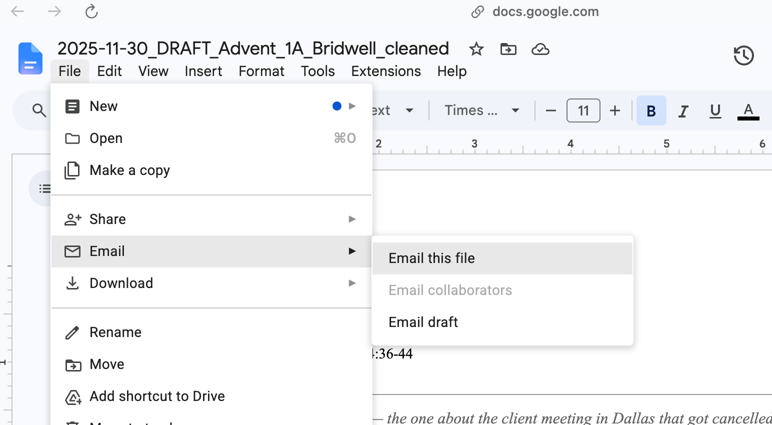
- Enter “upload@inbound.thadapp.com” for the email address. Enter the document type in the Message box (e.g. “New Sermon”).
![Enter "upload@inbound.thadapp.com" for the email address, "New [doc type] for the Message, and click "Send"](https://thadapp.com/wp-content/uploads/2026/06/docs_upload_google_docs_2.png)
- Click “Send”
- Wait 3-5 minutes and check your email (and Spam folder) for a response.
Common Questions
Can I upload documents by pasting them into the chat?
No. All uploads go through email to upload@inbound.thadapp.com. This ensures proper processing and metadata extraction.
What types of documents can ThAD manage?
Sermons, articles, pastoral letters, bible studies, forum posts, class materials, and other written works.
How long before my uploaded document appears in searches?
Documents are typically processed and available within a few minutes of upload.
Can ThAD access documents from other users?
No. Each user’s archive is completely separate. ThAD only searches your documents.
What if ThAD gets something wrong about my sermon?
ThAD pulls from your actual document metadata — if something looks off, the source document may need re-uploading. Ask ThAD to show the debug info if you’re troubleshooting.
Is ThAD connected to the internet?
ThAD can access your document archive through the ThAD API, the Revised Common Lectionary, the Bible (with apocrypha) in New Revised Standard and King James versions, and can search the internet for anything online whenever you ask. It does not have access to specific research databases or sites that require a subscription or login.